How to add or edit OAS Store Popup - Appeze
1. Log into mc.appeze.com.au
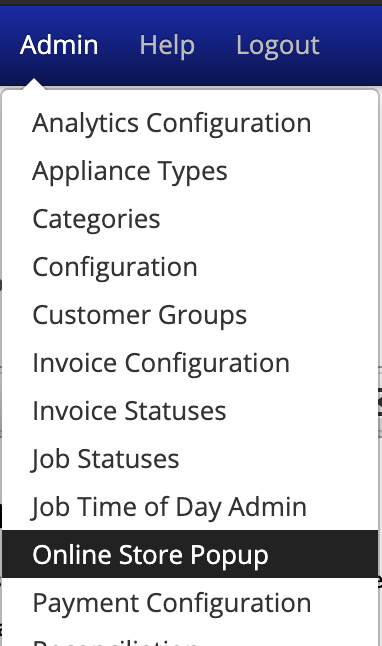
2. Click "Admin" from the main menu.
3. Click "Online Pop up" from the dropdown menu
4. To Disable or Enable the Popup functionality - click the Enabled checkbox;

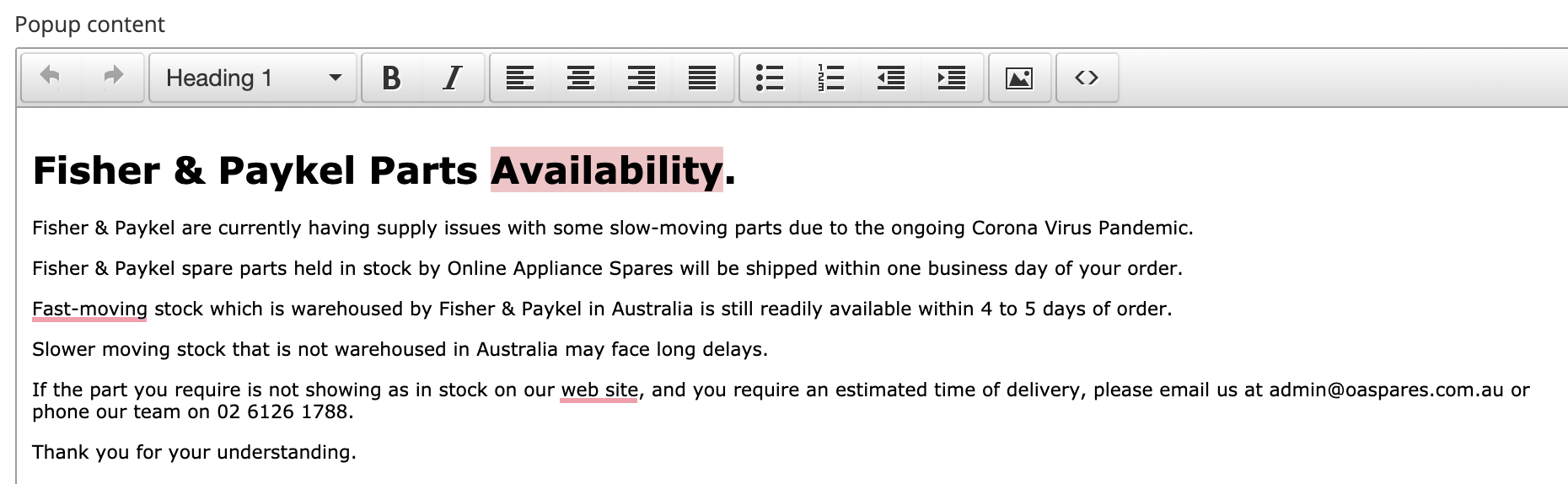
5. To customise your message for the popup then type in the WYSIWYG Box. The formatting of the box content does carry over to the live version of the popup. Formatting like italic, bullet points, bold is all carried across.
6. Finish up by clicking 'Save' at the bottom.
Related Articles
Frequently Asked Questions - APPEZE SOFTWARE
Below are some frequently asked questions and their answers; Questions Answer Are all other Appeze instances on the same server? Yes - with the exception of Appliance Supplies (Andrew Crowe) who have their own servers for their instance. How many ...How to add a new user to Wordpress
Along with other tasks - adding a new user to WordPress is the only a couple of minutes tasks and allows you to provide individual logins in order to accurately view changes and the history of those changes such as "Who Published what" and when. The ...How to add a new user to Wordpress
Along with other tasks - adding a new user to WordPress is the only a couple of minutes tasks and allows you to provide individual logins in order to accurately view changes and the history of those changes such as "Who Published what" and when. The ...How do I upgrade my plan or add a SmartLife Wi-Fi Extender?
There are two things you can do to get more out of your Infinite service — upgrade your internet plan, or add a SmartLife Wi-Fi Extender to improve wireless coverage in your home. Both can be arranged by contacting us directly. Upgrading your ...How do I update my payment details?
To update your payment method: Log into the Infinite customer portal - https://sso.infinite.net.au/login Go to Billing or Payment Settings Add or update your credit/debit card details Keeping your payment details up to date ensures uninterrupted ...